Prompt Design for Meeting Summary Generation
Effective prompts tell language models what to prioritize when summarizing meeting transcripts.

Transcription accuracy across the leading tools has converged at 90–95%+ in English, according to Simular's hands-on review that tested 8 tools across more than 50 meetings coffee.ai simular.ai. That convergence means the quality gap in meeting summaries has already moved somewhere else. It means the quality gap in meeting summaries has already moved somewhere else: not in how well the software hears you, but in how well it's told what to do with what it heard coffee.ai simular.ai. Hand any major language model a raw transcript and ask for a summary without a designed prompt, and the result is almost always the same three-part blob of overview, key points, and action items, whether it was a daily standup or a six-figure enterprise sales call. That's not a limitation of the model itself. It's a limitation of the instruction it was given.
This piece works through four structural choices that determine what comes back: how the model is told to frame its role, how explicitly the output format is specified, how much the prompt accounts for the specific type of meeting, and how instructions are ordered and supplemented with context. None of this is about picking a better tool, transcription accuracy, or the separate question of recording consent. It's about what happens after the words are captured, when a language model has to decide what mattered.
A meeting transcript as a difficult input to summarize well
Two distinct technologies do two distinct jobs in the pipeline behind an AI meeting note. Automatic speech recognition (ASR) turns audio into raw text, and a language model then reads that text and condenses it into something usable. The ASR layer gives you the words. The language model layer is where meaning actually gets extracted: action items, risk flags, commitment statements, the moment a speaker's answer quietly diverges from whatever they'd rehearsed going in.
Raw transcript, though, is a genuinely difficult input. It's a wall of text, usually full of crosstalk artifacts, mangled jargon, uncertain speaker attribution, and no built-in structure whatsoever. Nothing in the transcript itself tells the model that a throwaway comment about budget mattered more than five minutes of small talk about the weather.
The stakes of getting this right are not trivial. The average professional spends around 31 hours a month in meetings, and forgets roughly half of what was discussed within the first hour, climbing toward 70 percent forgotten within a day, consistent with the well-documented Ebbinghaus forgetting curve Atlassian research. A summary, then, is doing real cognitive work. It's doing real cognitive work, recovering information that would otherwise be gone by the next morning Atlassian research.
That's precisely why summarization is harder than it looks. The model has to infer what mattered from a stream that treats everything as equally important, and left without guidance, it defaults to the most generic signal hierarchy available to it. It will treat all talk-time as equally significant instead of weighting decisions and commitments more heavily than chatter. And it will bury action items inside narrative prose rather than surfacing them somewhere scannable. Because the input is noisy and structurally flat, the prompt is the only place the missing structure can come from. Predictable failure modes the LLM falls into without prompt guidance
Role framing: telling the model whose perspective to apply before it reads a word
Prepending a role declaration to a prompt, something as simple as "you are an experienced engineering manager" or "you are a senior enterprise account executive," changes what the model treats as signal before it ever touches the transcript. It's a small addition with an outsized effect.
The outputs diverge sharply when the same call runs through both frames. An engineering-manager frame surfaces blockers, technical debt flags, and sprint dependencies. An enterprise account executive frame, fed the identical audio, surfaces objections raised, budget signals, next-step commitments, and competitive mentions in the output. Nothing about the underlying conversation changed. What changed is the weighting the model applies to it, activating a different hierarchy of relevance from what it already knows rather than altering any fact in the transcript.
Role framing isn't a substitute for telling the model what sections to produce, that's a separate job, covered by output format instructions further down. What role framing does is set the interpretive lens through which everything else gets read. And specificity here pays off disproportionately: "experienced enterprise account executive covering EMEA mid-market" produces sharper, more consistent output than the flat, generic "sales person". Naming what the role is actually responsible for sharpens the lens further still, an EM who is described as "responsible for unblocking sprint delivery" will weight blockers and dependencies even more heavily than a bare EM frame would.
Mismatches carry a real cost, too. An engineering-manager frame applied to a board review will miss governance signals almost entirely, because governance simply isn't part of that lens. The role has to match the meeting itself, beyond just the industry. Of the four levers this piece covers, role framing is the cheapest and highest-leverage: a single sentence added to an otherwise generic prompt, with a disproportionate effect on what gets surfaced.
Explicit output format: why a named skeleton produces more stable notes than a tone instruction
"Make it concise and structured" is not an instruction so much as an invitation for the model to guess, and it will guess differently nearly every time it's asked. The instruction space is too wide, so the output varies run to run even when the underlying transcript hasn't changed. The fix is blunt: the more concrete the skeleton, named section headers, explicit fields, the more stable the output becomes across repeated runs of the same prompt.
A section structure built for actionable notes tends to include an executive summary held to 1–3 sentences maximum. From there: an agenda recap as a brief bullet list, key decisions each written as a bullet paired with its context, action items formatted as a table or clear bullets carrying owner, action, due date, and status, risks and issues with named owners attached, next steps describing what happens after the meeting, and a closing section for attachments or references mentioned along the way.
Action items deserve their own formatting rules within that skeleton, because this is the section people actually act on. A three-column structure, owner, action, deadline, keeps it scannable, and bolding the owner's name lets recipients find their own commitments at a glance. Specificity matters enormously here too: "send revised pricing deck to Dana by Friday" is an instruction someone can execute, where "follow up on pricing" is not. And the prompt needs to say, explicitly, that anything discussed but not decided should be left out, otherwise the model will pad the list with things that sound like commitments but were only floated.
A compact version of all this, tested and shown to be effective, reads something like: summarize this meeting with an executive summary, key decisions in bullets, action items in table format with owner and deadline, and next steps, using bold formatting for anything critical. What makes named headers work better than tone instructions comes down to how the model treats them: section headers function as hard constraints, while prose-style instructions like "keep it concise" get treated as soft preferences the model can trade off against other goals.
Meeting-type specificity: why one template cannot serve a standup and a sales discovery call
The generic overview-key points-action items format has a specific flaw: it prioritizes nothing. It's equally wrong for a standup and a board review, because it was never built with either one in mind. What actually changes between meeting types is the signal hierarchy, what counts as a decision, a risk, or a real next step is entirely context-dependent.
An engineering standup lives or dies on blockers, what's in progress, what's completed since the last check-in, and any dependencies now at risk. A sales discovery call runs on a different logic altogether: BANT or MEDDIC fields populated straight from the conversation, objections raised and how they were actually handled, buyer signals, and next steps with real dates attached. A customer success check-in needs open issues tracked by status, sentiment signals, and any renewal or expansion topic that surfaced, along with commitments made by either side. A sprint retrospective is about what worked, what didn't, and the specific process changes agreed to, with someone's name attached to each one. A board review needs decisions made, items tabled along with the reasoning for tabling them, action items with named executive owners, and anything that requires follow-up before the group reconvenes.
In practice, a small library is the answer. It's a small library, one purpose-built prompt per recurring meeting type, maintained rather than reinvented each time. What to exclude matters just as much as what to include: a discovery-call prompt should be told directly not to summarize product-feature discussion that never connected back to a buyer need, because otherwise that discussion crowds out the parts that actually mattered.
This is where role framing and meeting-type templates start reinforcing each other rather than working in isolation. As the connection to role framing from the previous section shows, the meeting-type template and the role framing reinforce each other (an AE role frame plus a discovery-call template produces output that is qualitatively different from either alone)
Context injection: what to feed the model alongside the transcript
A transcript-only prompt has a hard ceiling. The model can only work off the surface of what was said in that one conversation, it has no way of knowing what was decided last time, what stage a deal is at, or what this particular call was even supposed to accomplish.
Context injection closes that gap by feeding the model text alongside the transcript, separate from the audio itself. Meeting purpose might read something like: "this is a second discovery call with a prospect evaluating project management tooling; the first call established budget and identified two competing vendors". Attendee roles matter too, not just names but titles and their relationship to the deal or project, since the model uses that detail to judge who's actually making a commitment versus who's there in a supporting capacity. Prior decisions carried forward from an earlier session, and any known risks or sensitive topics that need careful handling, round out the picture.
The effect is a shift in what the model is doing. Instead of summarizing what was said, it starts interpreting what was said against what actually mattered going in, and the same exchange reads entirely differently once the model knows it's sitting inside the second call of a deal that's stalled. A well-structured summary produced this way can itself become the context fed into the next prompt, cascading quality forward instead of starting from zero at every meeting. None of this is free, though. Context injection adds tokens and adds latency, so the practical discipline is injecting what actually changes the output, not everything a practitioner happens to know about the account.
Instruction ordering and the structural choices that determine how the model reads the whole prompt
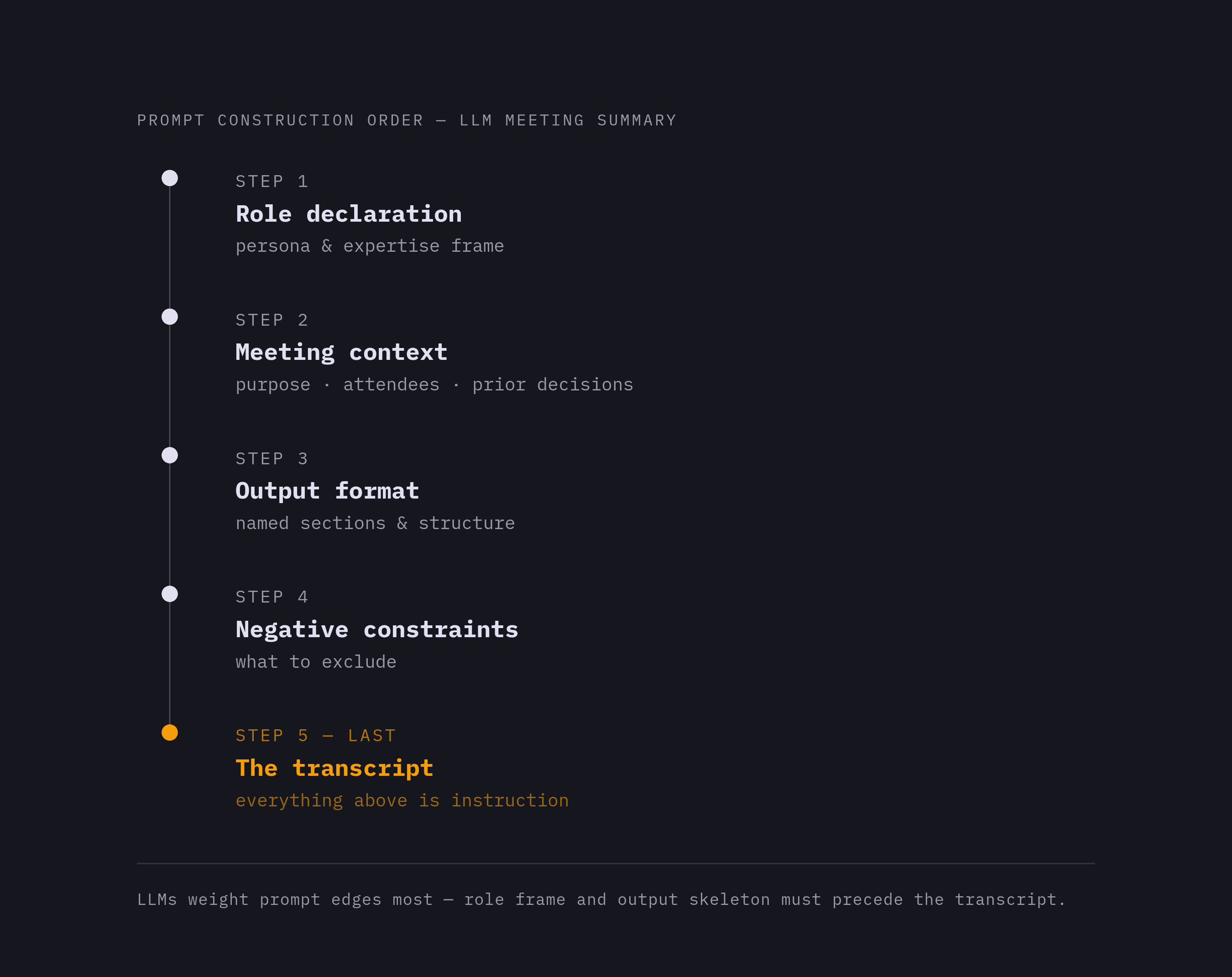
Where an instruction sits in the prompt is not a neutral choice. Most large language models weight instructions at the beginning and the end of a prompt more heavily than whatever sits in the middle. The role frame and the output skeleton belong before the transcript, not tacked on after it.
A workable sequence runs in five steps. Start with the role declaration, then the meeting context, purpose, attendees, and prior decisions, then the output format specification with its named sections, then the negative constraints, telling the model explicitly not to include items that were discussed but never decided, and not to simply summarize the conversation, and only then the transcript or audio itself.
Negative constraints in particular are underused relative to how much they help. Telling a model what to leave out prevents padding, prevents it from manufacturing certainty a conversation never actually reached, and tightens the action-item list down to things people can actually act on. Formatting details, bold text, table structure, bullet style, belong at the section level inside the skeleton rather than as a general instruction floating at the top of the prompt, since general formatting notes tend to get treated as style preferences while section-level instructions get treated as constraints the model has to honor.
A well-built prompt is one where a second run on the same transcript surprises no one. If it does, the prompt still has slack in it somewhere. Once a prompt has been built and proven out against real transcripts, it becomes a team asset, version-controlled and shared, because it has been tested rather than reinvented by whoever happens to need a summary that week.
Where prompt design ends and workflow automation picks up
None of this matters if the output just sits there. A clean, well-structured summary in a folder nobody opens has saved nothing, and that finding appears consistently across practitioner sources covering this space. The value of good prompt design isn't the document, it's what the document enables next.
That's exactly where structure earns its keep. Named owners, formatted action items, tagged decisions, these map directly onto CRM fields, task-creation rules, and routing logic, in a way that unstructured narrative prose simply cannot. And that distinction is the one that actually matters to anyone evaluating a tool: something that writes into structured fields is filterable, reportable, and usable inside workflow automation, while something that just logs an activity note is readable by a human and nothing more. Prompt design is what decides which category a given summary falls into.
The category itself is no longer niche. A practitioner survey found that roughly three out of four professionals now use some form of AI note-taker. Meeting data, structured consistently over time, becomes one of the richest sources of organizational context available to any AI system, a searchable institutional record instead of a pile of disconnected transcripts.
That record only pays off, though, where the plumbing exists to use it. Tools that connect into CRMs like HubSpot, Salesforce, or Attio, into project trackers like Linear or Asana, into communication platforms like Slack, or that expose API and MCP connectors for custom pipelines, are where structured prompt output finally gets its full return. The prompt design work happens upstream, but how much of that value actually gets captured depends entirely on what it plugs into downstream.
Prompt design, in the end, is a one-time cost that keeps paying out. A prompt library built around real meeting types and matched to the right role framing produces consistent, structured output that feeds automation, institutional memory, and every AI system downstream that depends on context, without demanding fresh effort for every single meeting.